Pebble Bot
Download

The AI ran out.
The week didn’t.

Pebbles are AI teammates. When one provider hits its limit, switch to another you’ve connected. Same Pebble, same conversation.

Switched provider. Still going.

One working week with a team of Pebbles

One working week.

Monday Plan the week.

Pebble turns a messy list into three clear priorities.

Pebble Chief of staff

Piper booked the kickoff.

09:00 to 12:00Pebble

Plan the week

“Pilot starts Friday. Page due Tuesday. Quotes Wednesday. Where do we start?”

  • Name one owner for pilot support
  • Landing page draft by Tuesday noon
  • Ask five customers for quotes
14:00 to 15:30Piper

Book the pilot kickoff call

Up nextDone

Tuesday Write the page.

A first draft before lunch, built from Monday’s plan.

Pebble Chief of staff

Scout has a shortlist.

09:00 to 12:00Pebble

Draft the landing page

“Use Monday’s plan. Keep it short. Two options for the button.”

  • Headline and three sections
  • Two button options to choose from
  • Ready for your review by noon
14:00 to 16:00Scout

Shortlist customers to ask for quotes

Up nextDone

Wednesday Your usual AI hit its limit.

You switch to another provider you’ve connected. Pebble shrugs and keeps going.

Pebble Chief of staff

Done by 16:30. Nothing waited.

08:30 to 11:30Scout

Collect customer quotes

  • Four quotes collected
  • Permission to publish each one
  • Shortest one picked for the top
14:00

Your usual AI: limit reached

Next reset in 3 days.

Switched to another provider you set up

15:00 to 17:30Pebble

Put the quotes on the page

  • Picked up from the same conversation
  • Quotes placed under each section

Thursday Back to the plan.

Piper writes the pilot support checklist. No waiting for a reset.

Piper Operations

Pebble checked the page.

09:00 to 12:00Piper

Pilot support checklist

“Customers start tomorrow. What does support look like?”

  • How customers reach you
  • A reply within two hours
  • When to escalate, and to whom
14:30 to 16:00Pebble

Final check of the landing page

Up nextDone

Friday The pilot starts.

Scout drafts a welcome for each customer. You send them.

Scout Sales

Piper is on support.

09:00 to 12:00Scout

Welcome five pilot customers

“A short welcome for each one, in their own context.”

  • Five welcome notes for you to send
  • Two kickoff calls proposed
  • Open questions passed to Piper
14:00 to 15:30Piper

First support questions answered

Up nextDone

Saturday A short recap.

Pebble sums up the week, so Monday starts with a plan.

Pebble Chief of staff

That’s the week.

10:00 to 13:00Pebble

Week in review

  • What shipped
  • What moves to next week
  • One decision for Monday

Switch the provider.
Keep the Pebble.

Each Pebble can use any model from the providers in your Hermes setup. Change it, and the Pebble, its memory and your conversation stay.

Pebble on Claude. Same memory, same conversation.

Providers keep their own accounts, limits and costs. Switching is your choice, not automatic, and works with providers you’ve already set up. Local models run through Ollama, LM Studio or a custom endpoint.

Meet the team in the app.

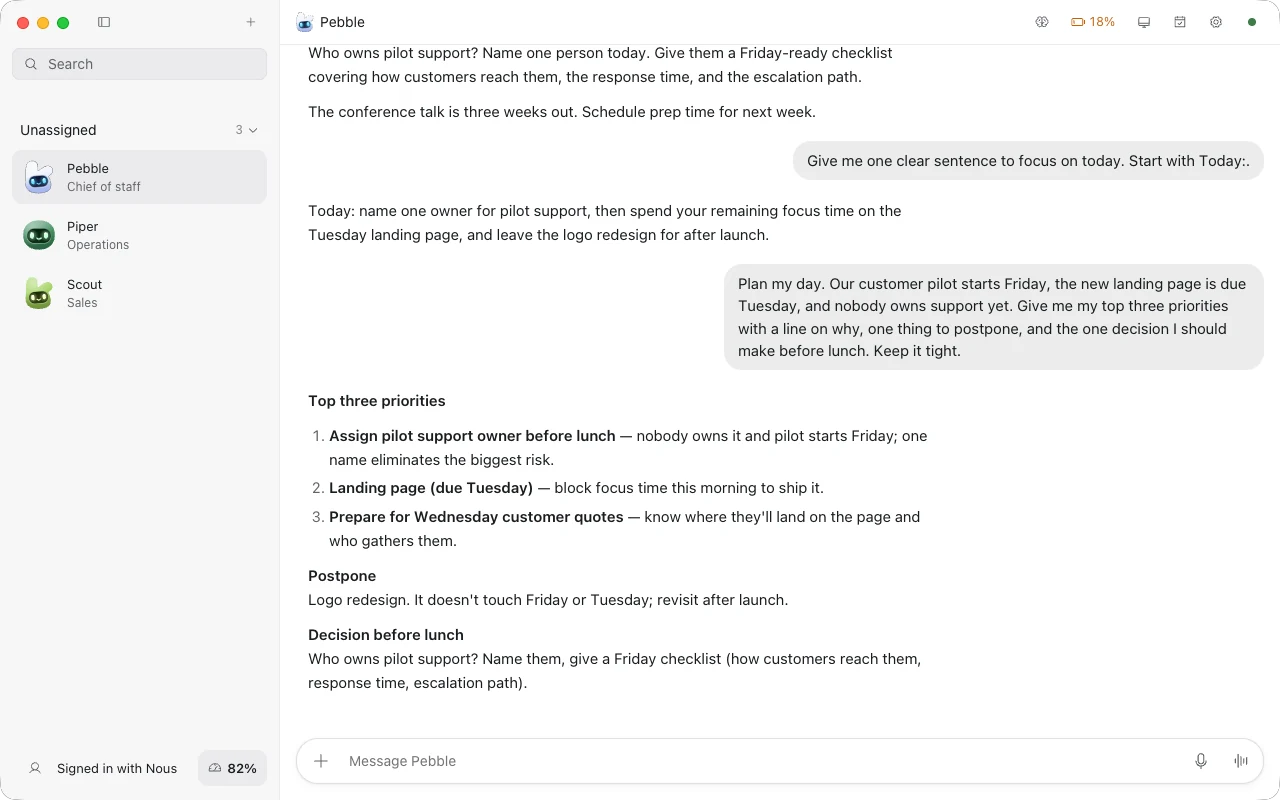
Pebble, the chief of staff, answering a planning request in the Pebble app, with Piper and Scout in the sidebar
Pebble, Piper and Scout in the Pebble app.

Navy, working

Make a Pebble yours.

The real Pebble artwork from the app. Pick a colour, a shape and a mood.

Colour

Expression

Shape

Your week doesn’t stop at a limit.

Pebble Bot

Pick any provider connected to your Hermes setup, per Pebble.

When one runs out, switch to another you’ve set up. The Pebble, its memory and the conversation stay.

Each provider still has its own limits and costs. Switching isn’t automatic.

Grok Bot

AI teammates with their own cloud computer. Bot usage is separate from your Grok and Cursor plans.

Source: xAI announcement

Muse by Meta

A personal AI agent powered by Muse Spark. Free for most of what people need, with subscription plans for more.

Source: Meta announcement

OpenAI dots

An always-on agent in ChatGPT, powered by GPT-6 Astra. Eligible plans include an allowance for deeper work, with extended limits in the first month.

Source: OpenAI help center

Documented approaches from official pages, checked October 3, 2026. Not a ranking of speed, quality or price. Others may offer upgrades or extra usage, and plans change.

Try it this week.

Download Pebble Bot for Mac or Linux and meet Pebble, Piper and Scout.

Version 0.2.5

Mac

Apple silicon

Download Pebble Bot.dmg disk image

Linux

x64 and Arm64

Download Pebble BotDebian / Ubuntu, x64 .deb

iPhone and iPad, Android, Windows: coming soon.

Pebble Bot connects to Hermes on your computer, your own server or Hermes Cloud. Model usage is billed by your providers.

Questions.

What do I need to run Pebble Bot?

The Pebble Bot app for Mac or Linux, and Hermes on your computer, your own server or Hermes Cloud. Model usage is billed by your providers.

Does switching remove usage limits?

No. Every provider keeps its own limits and costs. You switch to another provider you’ve already set up, when you choose to.

Which providers can a Pebble use?

The ones in your Hermes setup: for example Claude, GPT, Grok, Gemini, Hermes, Kimi, DeepSeek, Qwen, local models through Ollama or LM Studio, and custom endpoints. Some need their own account or API key.